How to Build an SEO-Friendly Website Structure: A Complete Guide
A well-organised website does more than make it easy for visitors to find information. It also helps search engines discover important pages, understand how content relates to other pages and navigate a website efficiently.
For Nigerian businesses, bloggers, news publishers and WordPress website owners, building an SEO-friendly website structure is an important part of creating a successful online presence. Even when a website publishes useful content, poor navigation, confusing URLs, weak internal linking and disorganised categories can make it harder for visitors to find relevant information.
Whether you are building a new website or improving an existing one, the right structure can support better usability, more efficient crawling and a stronger foundation for search engine optimisation.
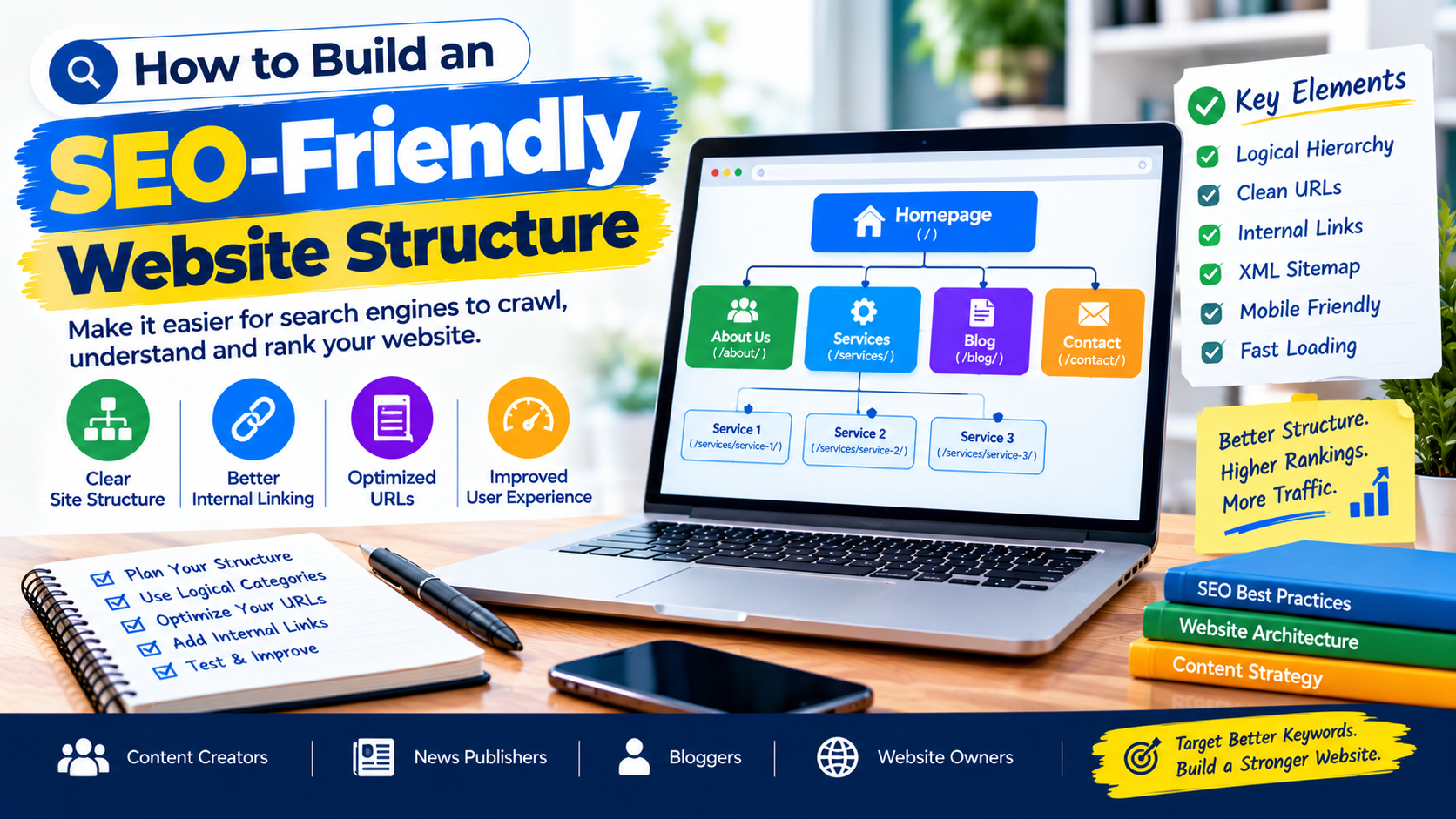
In this guide, you will learn how to organise your website, create logical page hierarchies, improve internal linking, optimise URLs and build a structure that supports both users and search engines.
What Is an SEO-Friendly Website Structure?
An SEO-friendly website structure is the way a website organises its pages, categories, menus, links and other content so visitors and search engines can understand how everything fits together.
A good structure makes important pages easy to find and establishes clear relationships between related topics.
For example, a web design agency might organise its website like this:
- Home
- About Us
- Services
- Website Design
- WordPress Development
- Website Maintenance
- Search Engine Optimisation
- Blog
- Contact Us
A news website might use a different structure:
- Home
- News
- Politics
- Business
- Education
- Health
- Sports
- Technology
- Opinion
- Features
- About Us
- Contact Us
These structures help visitors understand where to find information and allow related pages to link to one another naturally.
Google’s SEO guidance recommends organising websites logically, using descriptive URLs and grouping related content where appropriate. However, a particular folder structure alone does not guarantee higher rankings. Internal links, content quality and other signals also matter.
Why Website Structure Matters for SEO
Your website structure influences how people navigate your content and how search engines discover and interpret your pages.
Here are some of the main benefits.
1. Helps Search Engines Discover Important Pages
Search engines use links to discover pages and explore relationships between them.
When important pages are linked from relevant sections of your website, search engines have clearer paths to find them.
For example, a blog post about WordPress security could link to a related article about website maintenance. These links help readers discover additional information while providing search engines with useful context.
2. Improves User Experience
Visitors should not have to click through several confusing menus to find a service, article or contact page.
A clear website structure allows users to understand where they are and what to do next.
This is particularly important for news websites, online stores and service businesses where visitors may arrive directly on individual pages from Google.
3. Strengthens Internal Linking
Internal links connect pages within the same website.
A well-planned structure makes it easier to connect related articles, services, categories and resources.
For example, a Nigerian digital marketing agency could link an article about keyword research to related guides about technical SEO and content optimisation.
4. Supports Efficient Crawling and Indexing
Search engines need to discover and process your pages before they can appear in search results.
A logical structure, accessible navigation and crawlable internal links can make that process easier.
However, a page can still remain unindexed for reasons unrelated to website structure, including duplicate content, indexing directives, technical errors or insufficient value.
5. Helps Visitors Find Relevant Content
When users can easily move from a general topic to a specific page, they have more opportunities to discover useful information.
For publishers, this can help readers explore related reports. For businesses, it can guide potential customers from service information to enquiry pages.
1. Plan Your Website Hierarchy Before Building
The first step is to plan your website hierarchy.
A hierarchy establishes the relationship between your homepage, main sections, categories and individual pages.
For a small business website, the hierarchy might look like this:
Homepage → Services → Website Design → Website Design Service Page
For a news publisher, it could look like this:
Homepage → Politics → Kano Politics → Individual News Article
These examples represent logical relationships, not mandatory URL formats.
Before building your website, list the pages you need and group them according to their purpose.
Ask yourself:
- What are the main sections of the website?
- Which pages are most important?
- Which pages belong together?
- What information will visitors expect to find?
- How will users move between related pages?
- Which pages need to appear in the main navigation?
Planning first can prevent unnecessary restructuring later.
2. Organise Content Into Relevant Categories
Categories help group related pages and make large websites easier to navigate.
For example, a technology blog might use categories such as:
- Website Development
- Search Engine Optimisation
- Cybersecurity
- Mobile Applications
- Digital Marketing
A news website might organise its reporting into Politics, Business, Education, Health, Sports and Entertainment.
Choose categories that accurately reflect your content and the needs of your audience.
Avoid Creating Too Many Categories
Creating a separate category for every article can make a website difficult to manage.
For example, a news publisher does not necessarily need separate categories for every town, every public official and every individual event.
Instead, create a manageable hierarchy and use tags or other appropriate taxonomies when they genuinely help readers discover related content.
Avoid Empty and Duplicate Categories
Before creating a category, consider whether you will publish enough relevant content to make it useful.
Review overlapping categories periodically and consolidate them where appropriate.
Do not delete or merge established categories without checking the effect on existing URLs, internal links and search traffic.
3. Create Clear and SEO-Friendly URLs
Your URLs should be understandable to people and easy to maintain.
Compare these examples:
Poor URL:
example.com/page?id=4827
Better URL:
example.com/services/website-design/
The second URL communicates the subject more clearly.
For a blog article, a descriptive URL might be:
example.com/blog/seo-friendly-website-structure/
For a news article, it might be:
example.com/news/kano-education-development/
These are illustrative examples.
Good URL practices include:
- Use descriptive words.
- Keep URLs reasonably short.
- Separate words with hyphens.
- Avoid unnecessary parameters where practical.
- Use a consistent URL convention.
- Avoid changing established URLs without a good reason.
Do not force every keyword into a URL. A short, descriptive slug is usually preferable to a long string of repeated search terms.
Should You Change Existing URLs?
Not necessarily.
If your website already has indexed URLs, changing them simply to make them appear more SEO-friendly may create unnecessary risks.

When a URL must change, implement an appropriate permanent redirect from the old URL to the relevant new destination and update internal links, canonical references and sitemap entries.
Avoid redirecting unrelated old pages to the homepage simply to prevent 404 errors.
4. Build an Effective Internal Linking Strategy
Internal linking is one of the most important elements of website structure.
An internal link connects one page on your website to another page on the same website.
For example, an article about website speed could link to your guides on image optimisation, WordPress caching and Core Web Vitals.
These links help visitors explore related topics and help search engines discover pages and understand their context.
How to Improve Internal Linking
Follow these practices:
Link to relevant content. Add links when the destination provides useful additional information.
Use descriptive anchor text. Instead of writing “click here”, use wording such as “learn how to optimise WordPress images”.
Link to important pages. Make sure key services, guides and category pages are accessible through relevant internal links.
Link from older articles to new ones. When publishing a new guide, review existing articles that could naturally reference it.
Avoid excessive linking. Every link should serve a purpose for the reader.
Google’s link guidance recommends crawlable links and descriptive anchor text. Every important page should ideally have at least one internal link from another page on the site.
Example of an Internal Linking Structure
Suppose you publish these articles:
- How to Build an SEO-Friendly Website Structure
- How to Do Keyword Research Without Expensive SEO Tools
- How to Optimise Images for a News Website
- How to Fix WordPress Indexing Problems
Your first article could link to the keyword research guide when discussing content organisation, and to the indexing guide when explaining crawlability.
The links should be relevant to the surrounding discussion rather than inserted simply to increase link counts.
5. Optimise Website Navigation and Menus
Your main navigation should make it easy for visitors to reach the most important sections of your website.
For a business website, a straightforward menu could include:
Home | About | Services | Blog | Contact
For a news website, the menu might include:
Home | Politics | Business | Metro | Sports | Entertainment
The exact menu depends on the publication’s coverage and audience.
Navigation Best Practices
- Use clear, familiar labels.
- Keep the main menu manageable.
- Group related pages logically.
- Make important sections easy to access.
- Ensure menus work on mobile devices.
- Avoid unnecessary layers of dropdown menus.
- Provide a clear route back to the homepage.
Do not place every page in the main navigation. Use category pages, contextual links and other appropriate navigation elements to connect the remaining content.
6. Use Breadcrumb Navigation
Breadcrumbs show visitors where a page sits within a website’s hierarchy.
For example:
Home → SEO Tips → Website Structure → Article
Breadcrumbs can help readers understand their location and move back to broader sections without repeatedly using the browser’s back button.
They can be especially useful on large websites, online stores and news publications with extensive category structures.
If your website uses breadcrumbs, ensure they represent a meaningful navigation path and that the links work correctly.
You may also implement appropriate BreadcrumbList structured data to help Google understand the breadcrumb information.
Remember that valid structured data does not guarantee that Google will display a breadcrumb enhancement in search results.
7. Create a Logical Category and URL Structure for News Websites
News publishers often publish hundreds or thousands of articles over time.
Without a clear structure, important stories can become difficult to discover, and category pages may contain unrelated content.
A practical news website structure might include:
- News: Current reports and breaking developments
- Politics: Elections, governance and political parties
- Business: Markets, companies and the economy
- Education: Schools, universities and education policy
- Health: Public health and medical developments
- Sports: Football and other sporting events
- Features: Interviews, analysis and human-interest reporting
Each article should be assigned to the most appropriate category.
For local news publishers in Nigeria, location-specific coverage can also be organised thoughtfully. A publisher covering Kano and neighbouring states might develop useful sections for local government, education, business and community affairs.
Avoid creating hundreds of thin location pages that offer little original information.
What About Tags?
Tags can connect articles covering related people, places, events or subjects.
However, tags should serve a genuine editorial or navigation purpose. Automatically generating large numbers of near-duplicate tag pages can create clutter.
Review your CMS settings to ensure that low-value taxonomy pages are handled appropriately rather than assuming every archive must be indexed.
8. Build Topic Clusters for Your Blog
A topic cluster is a group of related articles organised around a broader subject.
For example, a website offering SEO services could build a cluster around website optimisation.
The main guide might be:
SEO-Friendly Website Structure
Supporting articles could include:
- Keyword Research for Beginners
- Image Optimisation for SEO
- Internal Linking Best Practices
- WordPress Technical SEO
- How to Fix Indexing Problems
- How to Improve Website Speed
The main guide can link to the supporting articles, while the supporting articles link back when useful.
This helps readers explore a subject in greater depth and gives your website a coherent content structure.
Do not create a topic cluster merely to repeat the same keywords across several pages. Each article should address a distinct question or user need.
9. Create and Submit an XML Sitemap
An XML sitemap lists URLs that you want search engines to discover.
For larger websites, it can be particularly useful for communicating the URLs that should be crawled, including recently published or updated content.
WordPress and many SEO plugins can generate XML sitemaps automatically.
After confirming that your sitemap is working:
- Open Google Search Console.
- Select the correct website property.
- Open the Sitemaps report.
- Enter the sitemap URL.
- Submit it.
- Review any reported errors.
Include the correct canonical URLs that you want Google to index.
Do not include URLs that should not appear in search results, such as pages intentionally marked noindex, or duplicate URL variations that are not your preferred versions.
A sitemap helps Google discover URLs, but submission does not guarantee that every URL will be crawled or indexed.
10. Make Sure Important Pages Are Crawlable and Indexable
A good structure cannot help a page appear in search results if technical settings prevent it from being indexed.
Review the following:
Robots.txt
Check that your robots.txt file does not unintentionally block important pages or resources that search engines need to understand the page.
Noindex Directives
Check whether important pages contain a noindex directive.
If a page should appear in Google Search, ensure it is not accidentally excluded.
Canonical URLs
Use appropriate canonical tags to indicate the preferred URL when duplicate or very similar versions of a page exist.
Broken Links
Fix broken internal links and update links that point to outdated destinations.
Redirects
Ensure redirects lead to the most relevant destination and avoid unnecessary redirect chains.
Search Console
Use URL Inspection in Google Search Console to check how Google sees important pages and investigate indexing issues.
Remember that crawlability, indexability and ranking are different things. A technically accessible page is not automatically guaranteed to be indexed or rank well.
11. Build an SEO-Friendly Website Structure in WordPress
WordPress provides several features that can help you organise a website without custom development.
These include pages, posts, categories, tags, menus and navigation blocks.
For a service business, use pages for core business information and services, then organise supporting educational articles under the blog.
For a news publisher, use categories that reflect the publication’s editorial structure and assign articles consistently.
Recommended WordPress Practices
Use categories carefully. Create a manageable set of meaningful categories rather than a separate category for every article.

Configure permalinks consistently. Choose a URL structure appropriate for your website before publishing large amounts of content.
Use an SEO plugin responsibly. Configure titles, meta descriptions, canonical URLs, XML sitemaps and robots directives correctly.
Review archive pages. Check category, tag, author and date archives to ensure they provide useful navigation and do not create unnecessary duplication.
Use breadcrumbs where appropriate. Your theme or SEO plugin may provide breadcrumb functionality.
Check mobile navigation. Ensure the menu remains easy to use on smaller screens.
Audit plugins and themes. Remove unnecessary features that create maintenance or performance problems.
If you are redesigning an established WordPress website, document the current URLs before making structural changes.
12. Keep Your Website Fast and Mobile-Friendly
Website structure is not only about URLs and links. It also involves how people navigate and use the site.
A poorly organised mobile menu can make an otherwise excellent website difficult to use.
Similarly, oversized images, heavy scripts and excessive advertising can make navigation frustrating.
Improve the overall experience by:
- Using responsive layouts.
- Optimising images.
- Avoiding intrusive pop-ups.
- Keeping menus simple.
- Maintaining readable typography.
- Reducing unnecessary scripts.
- Monitoring Core Web Vitals.
- Testing important pages on real mobile devices.
For Nigerian audiences who may rely on mobile data or experience inconsistent network speeds, efficient page delivery can be particularly valuable.
13. Common Website Structure Mistakes to Avoid
Avoid these common problems when building or improving your website:
Creating too many categories: This can make navigation confusing and produce overlapping archive pages.
Using unclear URLs: Random identifiers and unnecessarily complex URL patterns are less helpful to visitors.
Leaving important pages orphaned: Important pages should have appropriate internal links pointing to them.
Overloading the main menu: Too many menu items can make it difficult to find key sections.
Using generic internal link text everywhere: Descriptive links give readers more useful context.
Creating duplicate content sections: Similar categories and archives can make the website harder to manage.
Changing URLs without redirects: This can disrupt existing links and access to old URLs.
Ignoring mobile users: A navigation structure that works on a desktop may fail on a phone.
Submitting a sitemap and assuming the job is done: Continue monitoring crawl and indexing reports.
Building the website for search engines alone: The structure should help real visitors complete their tasks.
SEO-Friendly Website Structure Checklist
Use this checklist when launching a new website or auditing an existing one.
The homepage links to the most important sections.
Pages are organised into meaningful groups.
Main navigation labels are clear.
Important pages have internal links.
URLs are descriptive and consistent.
Categories and tags serve a useful purpose.
Breadcrumb navigation works where appropriate.
The XML sitemap contains the intended canonical URLs.
Important pages are not accidentally blocked or marked
noindex.Canonical tags are configured correctly.
Broken links and unnecessary redirects are addressed.
The website works well on mobile devices.
Search Console is configured and monitored.
Existing URLs are protected during redesigns.
Conclusion
Building an SEO-friendly website structure is an important step towards creating a website that is easy to navigate, maintain and discover.
Start with a logical hierarchy, organise related content into meaningful categories, use descriptive URLs, connect relevant pages with internal links and make important sections accessible through clear navigation.
For WordPress websites, configure categories, permalinks, breadcrumbs and XML sitemaps carefully. For news publishers, establish an editorial structure that helps readers discover related stories without creating unnecessary categories or duplicate pages.
Finally, monitor your website through Google Search Console and review the structure as your content grows.
A well-organised website does not guarantee first-page rankings, but it provides a stronger foundation for useful content, effective crawling, good user experience and long-term SEO growth.